Introduced a unified design language and component library to a platform that had grown feature-by-feature without consistent interaction patterns. Established structured UX research practices — including shadowing sessions with integrators and synthesis from field visits — that brought operator insight into a development process previously driven entirely by technical requirements. Across multiple complex workflow areas, reduced the specialist knowledge required to operate the system safely, making advanced robotics control accessible to a broader range of operator skill levels.
Overall Impact
Looking back, a few things have become very clear to me:
No single workflow fits every integration project.
Every design decision involves trade-offs. There is no single design that can cover all situations.
Guidance and flexibility must coexist.
Design and system architecture continuously shape each other.
The new WebUI was not redesigned overnight. It evolved through real constraints, real feedback, and real failures.
And we designers are still learning.
Because the outcome we care about is not simply a more beautiful interface. What matters more is reducing dead ends, uncovering hidden assumptions, and building shared understanding between people and the system they operate.
Jony Ive once said, “Simplicity is about bringing order to complexity.”
If our design can help turn a complex system into a clearer mental model—and present it in a more humane and approachable way—then we are moving in the right direction.
But we are not there yet. I know this not as a victory lap, but as an honest account of an ongoing design journey.
What we’ve learnt so far
Clarity: ensure users understand the meaning of the action and context
Efficiency: minimize the numbers of steps required to perform tasks; quickly find and access tools and information
Consistency: maintain a unified layout and terminology across WebUI
Safety: Prioritize critical functionalities to prevent user errors or enable recover flows
Four design principles
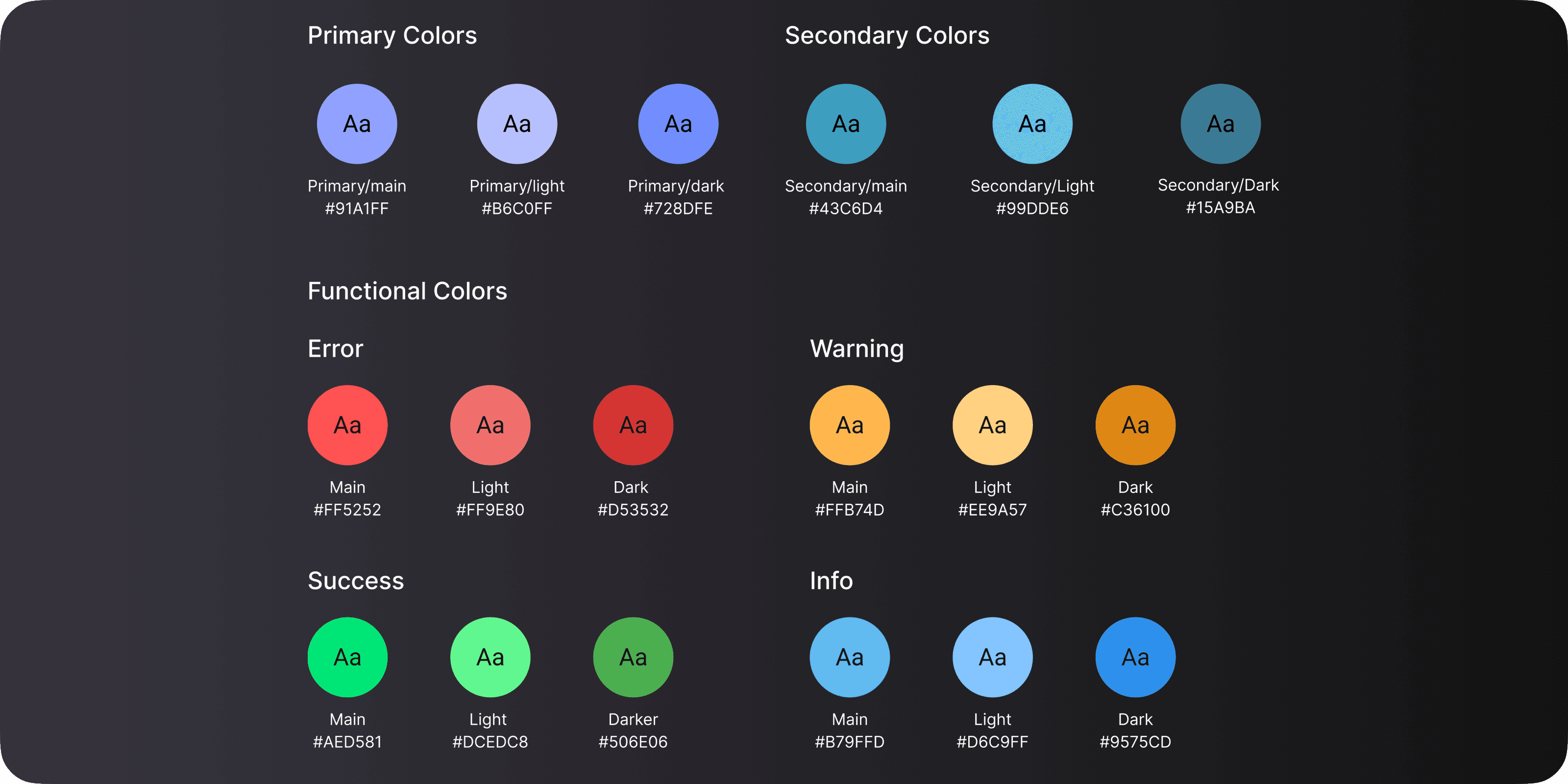
Why we changed our theme color to be blue tone, there are lots of customer feedbacks regarding our Mujin orange often associated with safety colors (warning yellow), also we know that:
Industrial Environment Considerations Prioritize high-contrast and legible color combinations to accommodate low-light or high-glare environments.
Use neutral grey backgrounds to reduce eye strain during prolonged use.
Avoid overly using bright or flashy colors that may distract or cause discomfort in high-stress industrial settings.
After careful consideration, we choose current palette. It has been tested well with dark mode in the warehouse environment.
Color principle
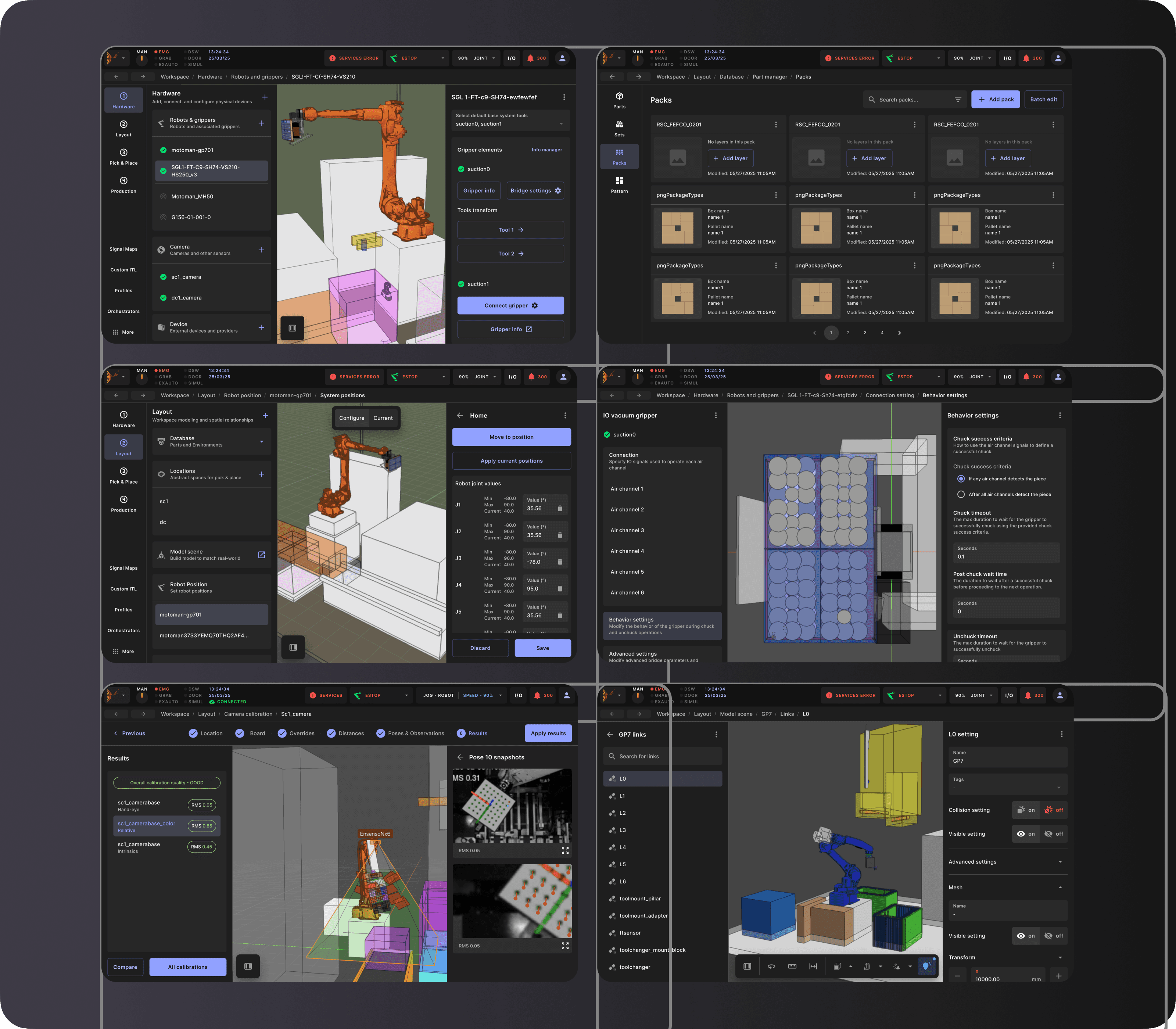
From design ops perspective, we also need better design system to support the complexity of the system, so we spent few months to work on the new interface:
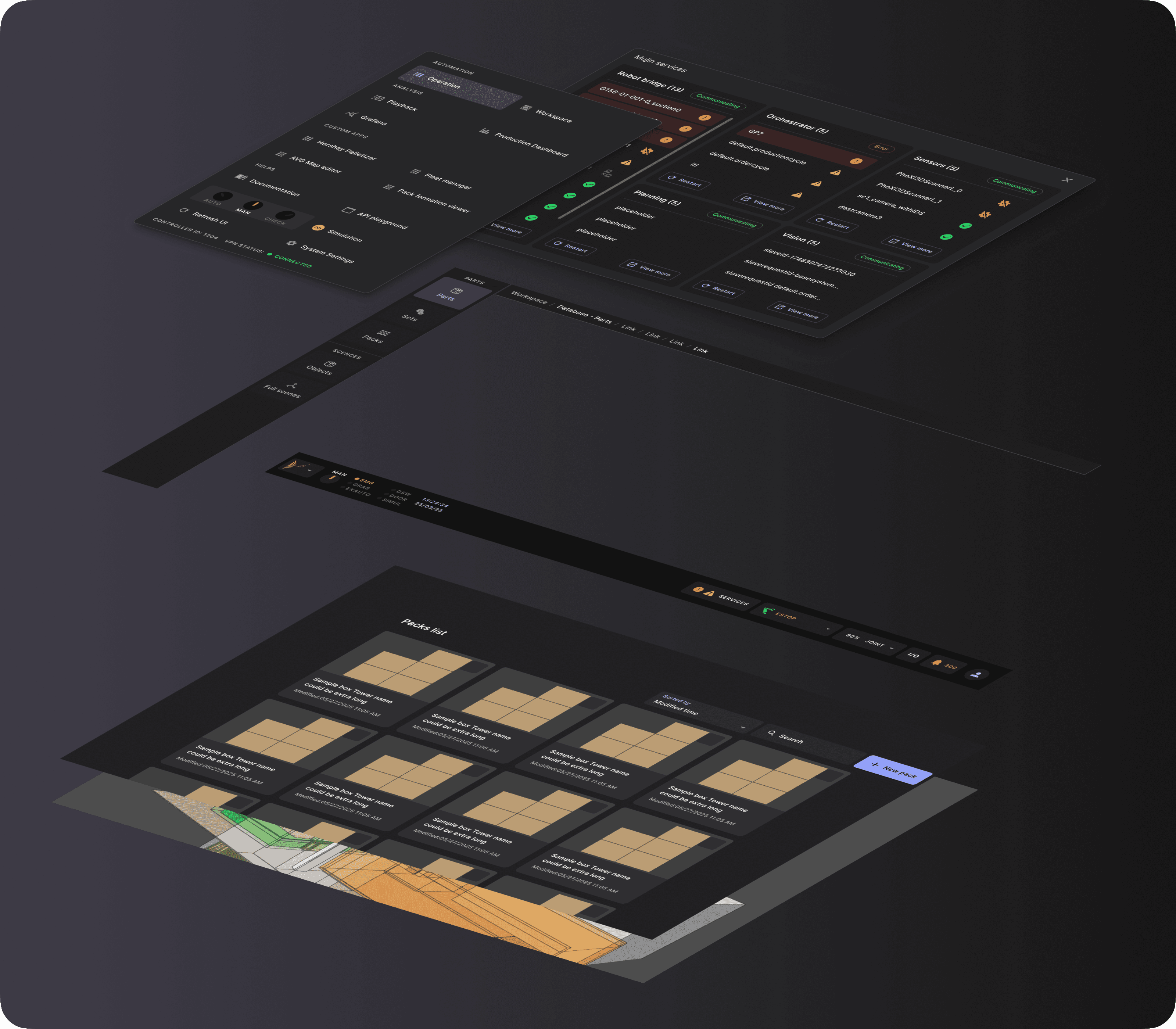
Navigation - We refreshed the global navigation structure by introducing a primary menu (aligned with the Classic UI mental model), redesigned breadcrumbs, a navigation rail and side panels (common UI pattern for 3D software). This was more about helping users maintain orientation while moving across different parts of WebUI. I took the inspirations from Christopher Alexander’s [A Pattern Language]. And thinking our layered system is like the city, so WebUI home as City town hall.
Design system - We migrated to MUI and established a more mature, shared design system across WebUI. This gave us a stable foundation for building and evolving components in a consistent way, and reduced the amount of one-off UI patterns that had accumulated over time. More importantly, it created a common language between designers and engineers, making it easier to reason about layout, interaction patterns and component behavior.
Visual schemes - The goal was not simply to make the UI look more modern, but to improve content hierarchy, readability and accessibility so that:
Information is easier to scan and digest.
Important states, warnings, and actions are easier to recognize in dense and high-stakes configuration screens.
Optimize the content sizes to fit to both PC and pendant.
A more restrained, calming and professional visual tone that better support industrial and production environments.
More complete experience
We introduced structured cycle: Pick and Place, Order cycle and production cycle steps
Now users can use Camera calibration, PDD, trajectory viewer
We’ve added some debugging tools as well
Interface overhaul
Stage 0 - Identify the pain points
Stage 1 - Iterations of work towards Information Architecture
Stage 2 - Improving the navigation
Stage 3 - Solidifying layout patterns
Stage 4 - Bringing feature parody from QML to webUI with new IA in mind
Dive deep into the process of this redesign
Pain Point 1: Low adoption from in-house experts to switch from legacy QML to new web UI. There remain key functionality on the legacy QML UI that in-house experts need to do their job, such as calibration details. This means that they are still using the old QML UI to meet their full needs. The main feature they use the new web UI for is the playback (sort of).
Pain Point 2: Foundational UI/UX issues. On the surface the web UI is slightly more modern but there are navigational challenges that make it confusing for people. Example: The use of all these individual apps that don’t connect as a user flow. As a result, it’s easier to ask an expert for help instead of trying (and failing) to accomplish a simple task.
In summary, the web UI is an improvement but isn’t ready for broad release and promotion because it neither meets the full needs of the in-house Mujin experts or has the ease to be appealing for new customers. We cannot solve all the problems at once but we believe a foundational step is to rethink the IA of the web UI and use it as a solid new foundation for further design improvements.
The pain points
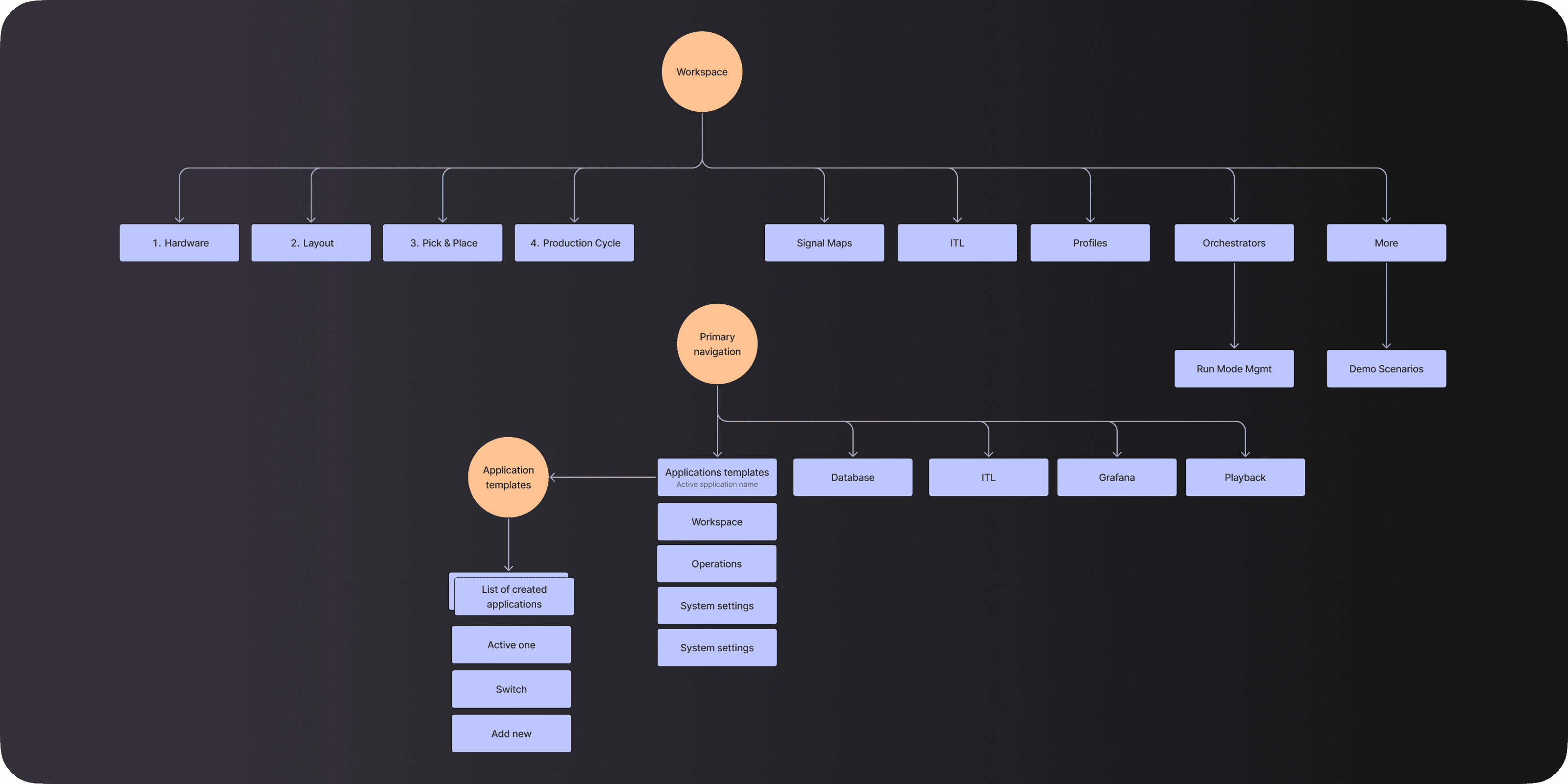
The scene editor was firmly established as the system’s center, but users are still not sure the next step. Experienced users could move fluidly, but new users felt lost unless they can follow user manual. The problem wasn’t the lack of features — it was the lack of explicit progression.
The turning point
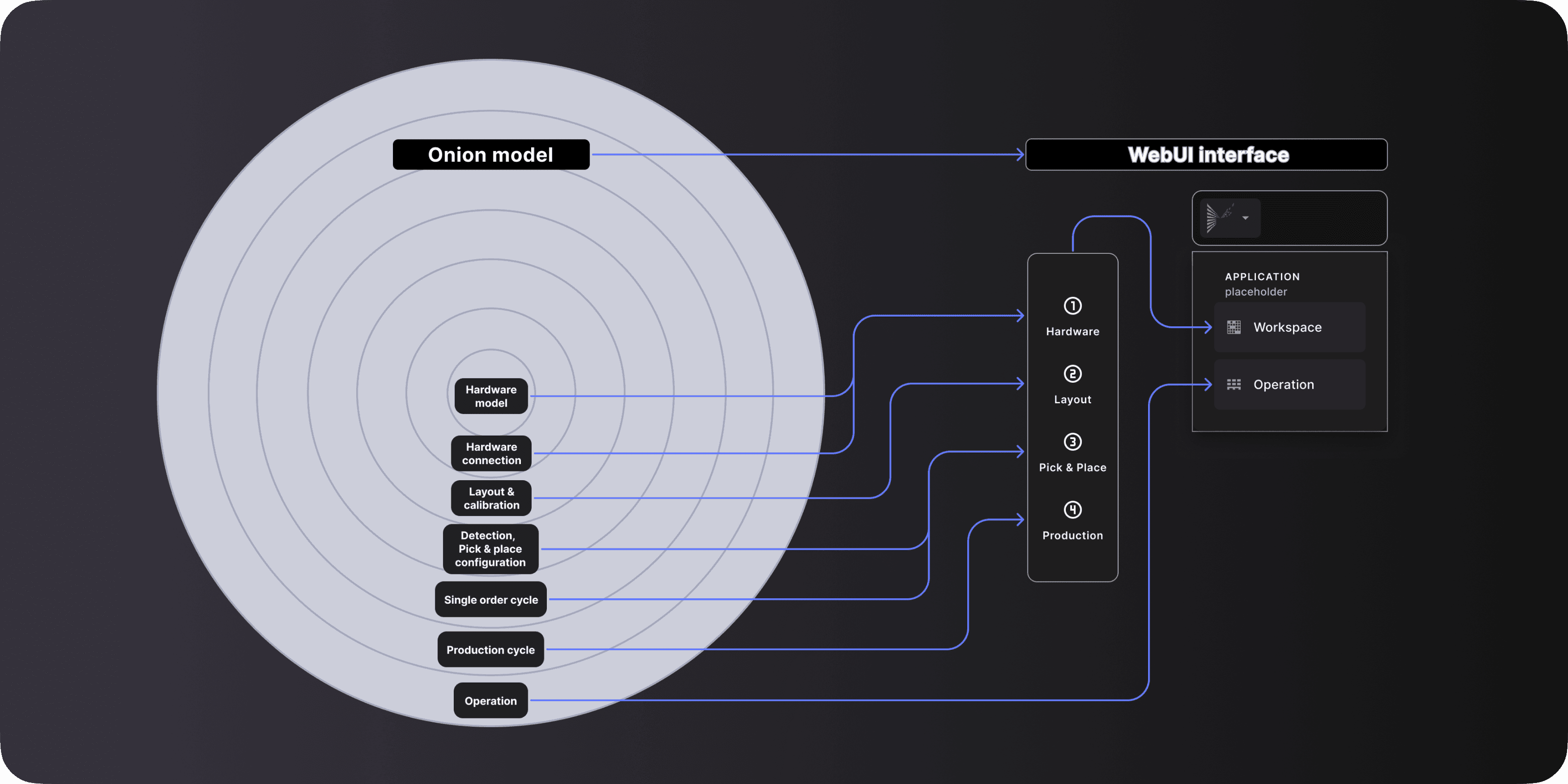
In April, Vision team has requested to improve the vision setup, front end started to do cell setups. Those sessions have helped us to understand a little bit more about the integration process. With more understanding, we need to think more from the foundational level. We landed on the Onion Model that represents system integration as concentric layers of functionality, where each outer layer depends on the proper configuration and validation of all inner layers.
Start of the redesign
After we have the conceptual framework of the system, we want to use more robust methodology to validate and create the design, so it’s not only the UX polish.
And we thought if the design is reorganized based on layers of the Onion Model, they can be the foundation of clearer steps that match the dependency requirements of the Mujin system, and ultimately prevent the yearly redesign of the webUI. We did the IA test with people cross the teams, created low-fidelity wireframes, and interviewed integration teams to get feedbacks.
We know that users need structure and guidance, but also deeply aware of system complexity and constraint, so this time we didn’t oversimplify the reality, instead we created lightweight steps — enough structure to clarify what comes next, without removing flexibility.
2025 Until now - The new chapter
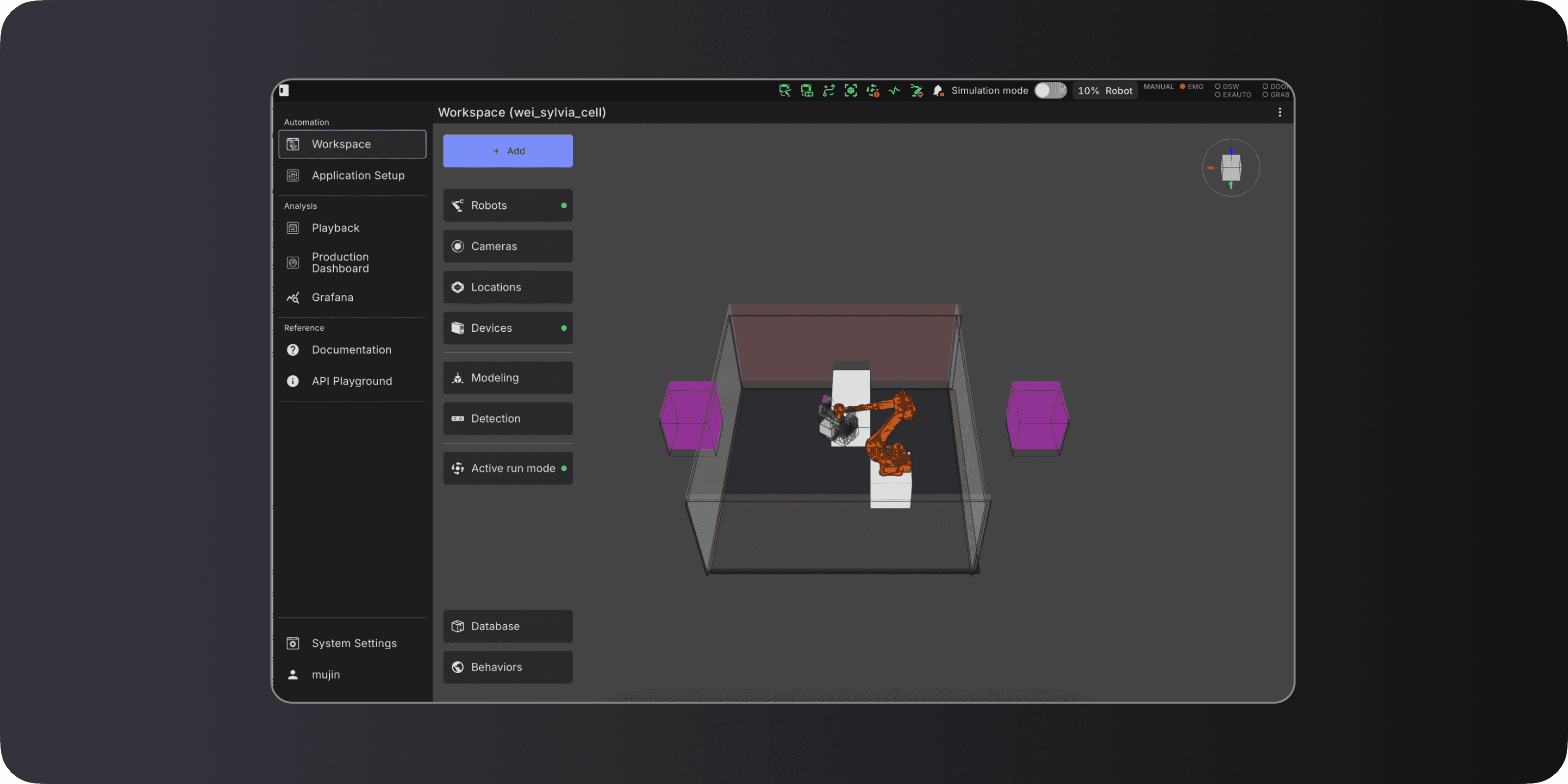
Based on previous experience, we simplified the navigation for integration-related tasks by presenting a single setup space centered around the digital twin that, when possible, exposes functionality in the context of where it's used.
What this unlocked
Efficiency through proximity: most actions are now 1–2 clicks away once users understand the layout.
Support for multiple workflows
Spatial context helped users understand what they were configuring
This redesign is better than previous versions because it improved efficiency, flexibility and clarity.
What still wasn’t solved
For new users, freedom can feel like ambiguity. The system still required click back and forth between areas, and the UI didn’t always explain “why now / what next.” The experience feels disjointed.
The UI improved in many ways compared to previous versions, but it still contained usability gaps, and the overall experience did not yet feel as fluid as we had hoped.
2024 - Scene as the center stage
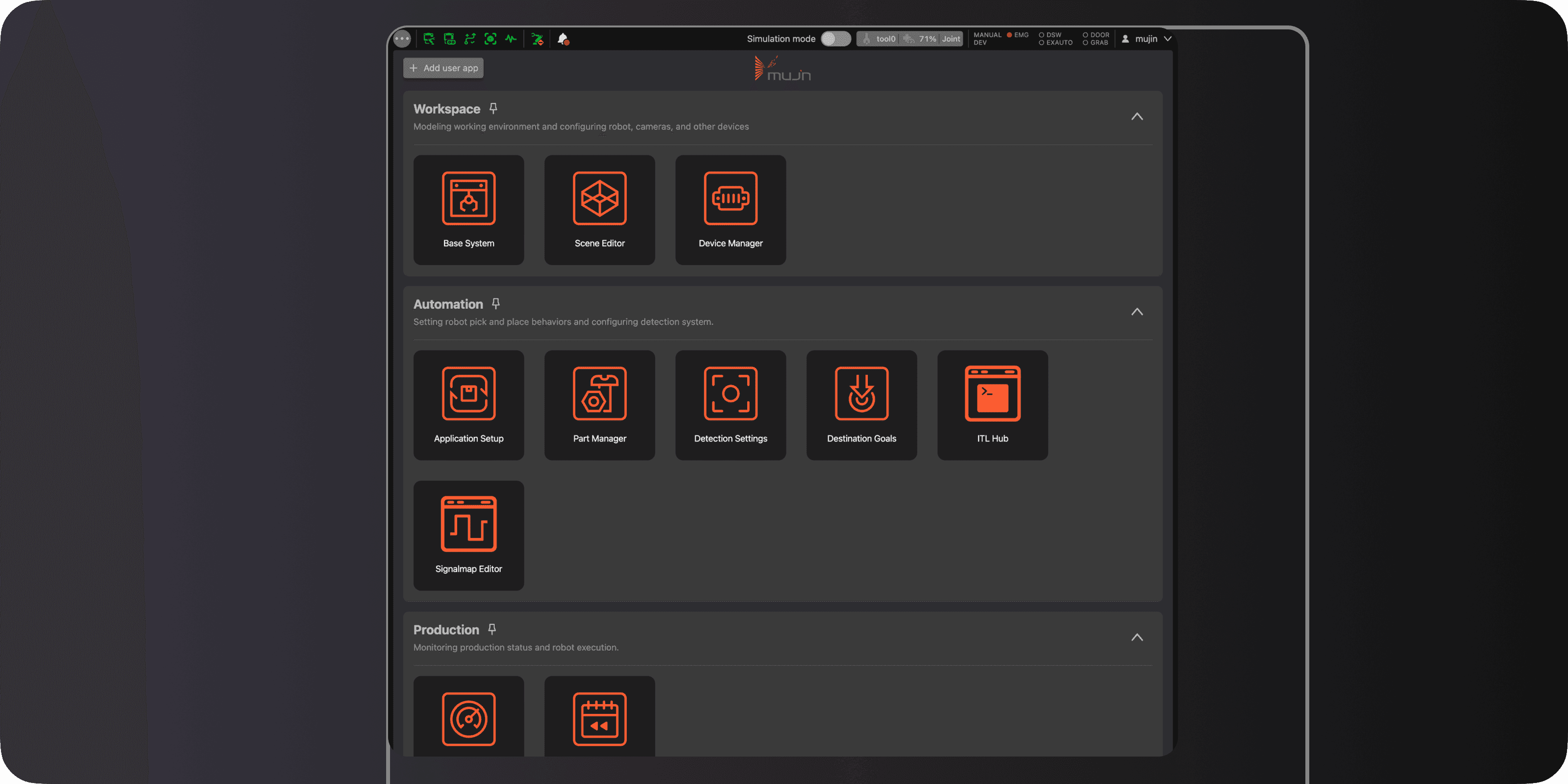
We moved away from a linear workflow toward an app-based model. Instead of one long setup flow, users opened different “apps” to accomplish specific tasks — similar to an app store. It is also similar to Classic UI. This was partly a technical choice: it aligned cleanly with how the system was developed and owned. It also looked like efficiency — but it was efficiency for the org more than for the users.
What worked
Easier to build and ship in modular slices
Easier for developer to use, it aligned with the code
What didn’t work
Fragmented workflow with unclear next steps - Even with task lists, users are directed to a page with numerous actions and no clear guidance on which action to take to complete the task
No consistent UI patterns - Patterns & navigations were not connected and not consistent as the designs between apps looked different from one screen to another. Every time users opened a new app they didn’t know what to expect. As such, the user could not build a mental model around how to find information easily.
This phase made something very clear:
Modularity without coherence feels overwhelming, which led us to a deeper rethink.
The early version followed a guided, step-by-step flow. UI was busy — but it gave new users a feeling of “I know what to do next” at the start.
What it got right
A sense of progress
Less cognitive load at the start
Where it failed
Constantly going back and forth between steps was not ideal: The reality was that setup could not be a seamless single linear flow (once and done), and a lot of the user’s time was going back and forth between steps. The going back to previous steps was not easy or intuitive given the many steps and sub-steps required.
It was easy to get lost even in a linear flow. There are so many steps that users will inevitably need to scroll through a long list. Steps often have dependencies on other steps that come later.
Different correct workflows exist for different applications and project teams. Forcing a single linear flow made a good experience for some, while restricting flexibility for others. It was difficult to provide one fixed flow that would satisfy each project, especially if the steps branched out. As a result, the ordering of steps didn’t always work well, furthering the need to skip steps.
Inability to order similar tasks together. When ordering only by steps, we sacrificed grouping by similar functionality.
This was our first major lesson: Guidance is helpful, but rigidity is costly.
2020 - The illusion of linearity
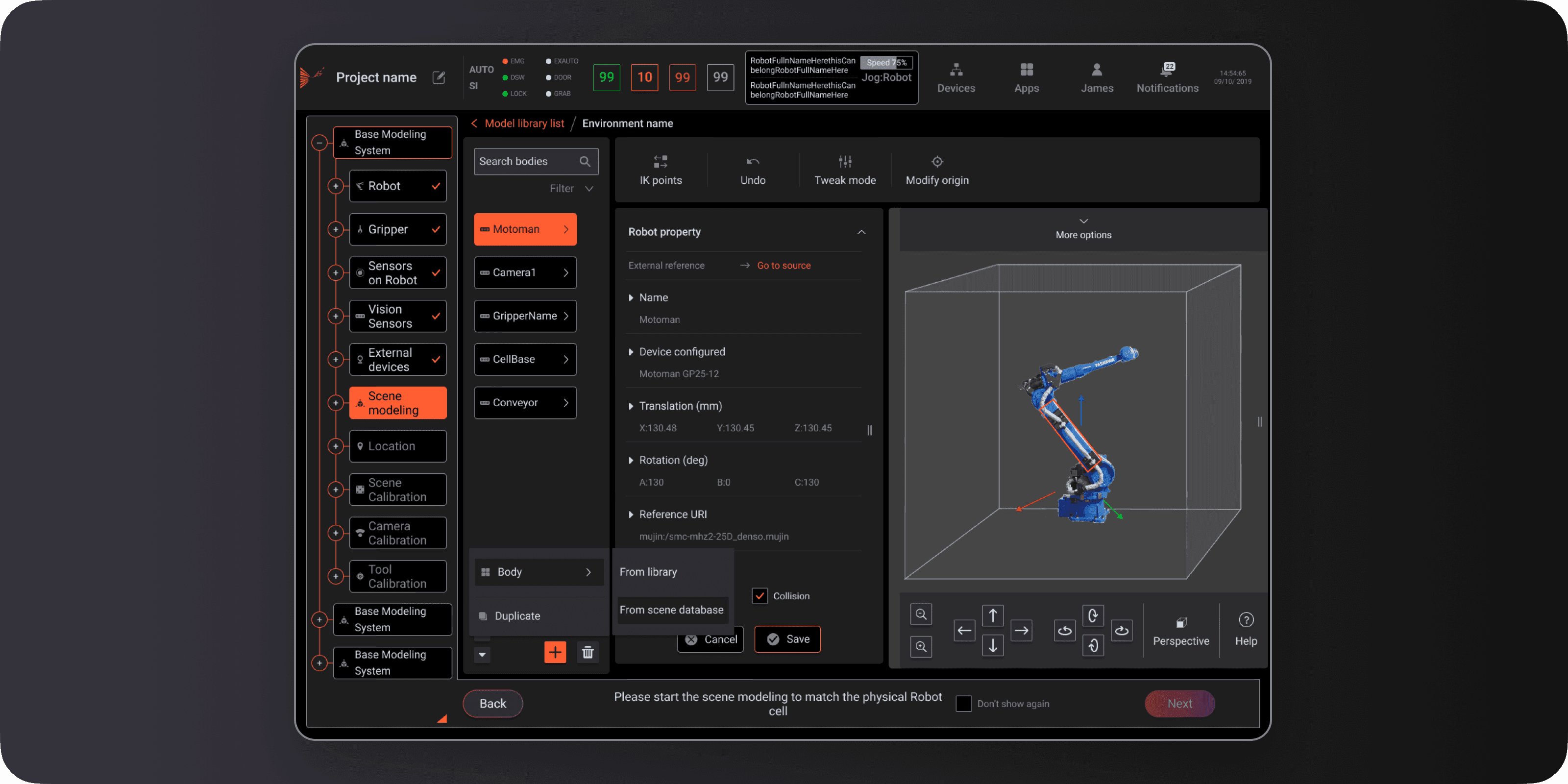
I joined as one of the three product designers responsible for the end-to-end redesign of Web UI. The existing design system feels. outdated, no established research practice, and no design precedent for several of the interface types I was building. I worked directly with robotics engineers, backend developers, and field deployment specialists, and was responsible for everything from initial problem framing through to shipped components — including establishing the design principles the team now works from.
My Role & Contribution
Mujin builds industrial robotics automation for warehouse environments — pick-and-place, palletizing, case handling. Mujin System is that used by two distinct user types: system integrators who configure and deploy the robot at a new site, and field operators monitor and operate, their mental models, technical vocabularies, and error tolerances are completely different.
The interface WebUI (the primary interface used by system integrators and field operators across Japan warehouse automation deployments. ) has to work for both. Web UI has been there for a while. When I joined, the platform had grown feature-by-feature without a unified design language or interaction framework. Powerful capability was buried under inconsistency.
Every major updates of WebUI, the team tried to make a complex, layered system feel understandable without hiding much about that system complexity. Each iteration solved real problems, but also revealed new ones. Looking back, what’s most interesting isn’t which design was “right,” but why each design made sense at the time — and where it didn’t work in practice.
The Context
The evolution of Web UI design
Redesign an industrial robotics control software
Home
Work
About